General architecture
askacharge.com is a multi-tenant SaaS platform for managing electric vehicle chargers (CSMS — Charging Station Management System). The backend is built on FastAPI (Python, async) with native WebSocket support for OCPP, a PostgreSQL database, and a React frontend. Each brand manages its own charger fleet, tariffs, clients and billing in full isolation, all running on a shared deployment.
Both OCPP 1.6J and OCPP 2.0.1 are supported on the same server, tested with the OCTT (OCPP Compliance Testing Tool) from the Open Charge Alliance. The base URL for the API and WebSocket is:
https://askacharge.com/askacharge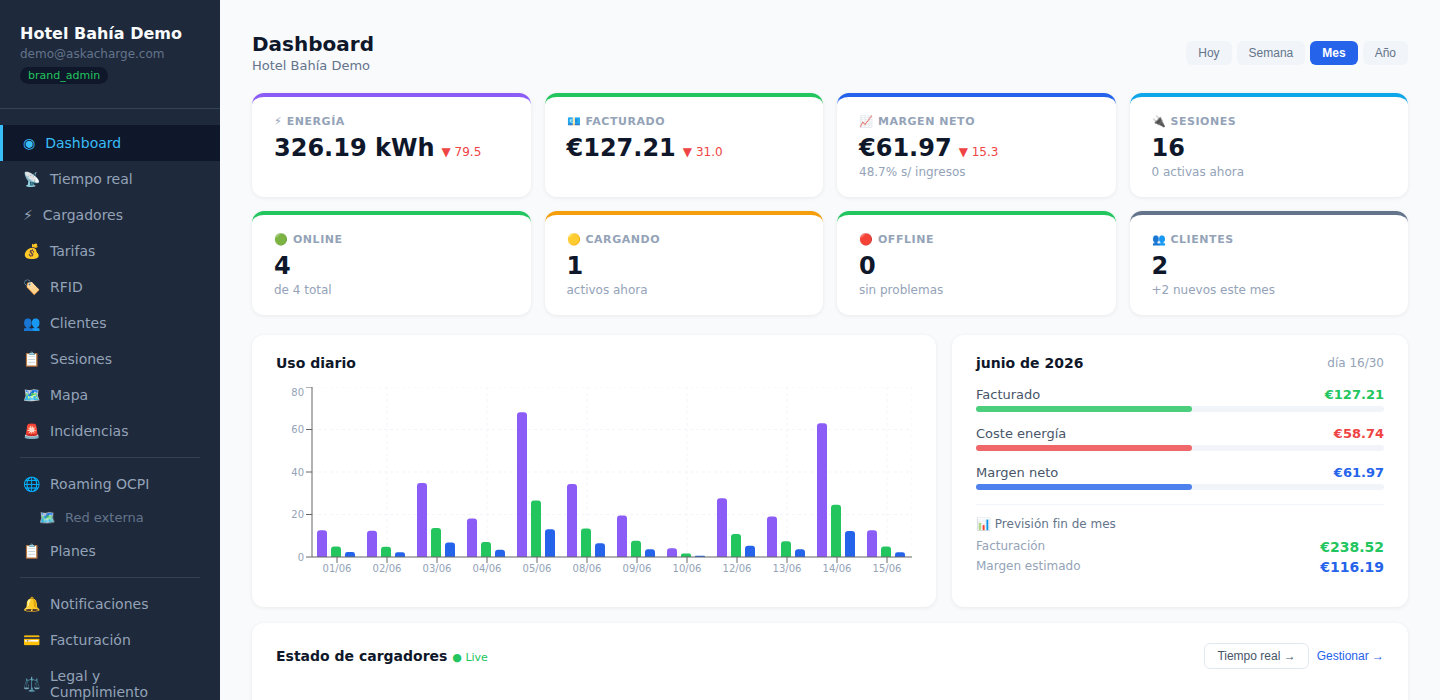
Authentication and roles
Authentication uses JWT (Bearer token), obtained via POST /api/auth/login
(OAuth2 password flow: username + password as form-data).
The access token expires after 30 minutes; a refresh token (httpOnly cookie) is used to renew it without logging in again.
User layers
| Role | Scope |
|---|---|
superadmin | Global management of brands and the Hub |
brand_admin | Full control of their brand, including billing and team management |
brand_technician | Brand operations (chargers, tariffs, incidents) without access to billing or team settings |
brand_viewer | Read-only: dashboard, tariffs and clients, without financial figures |
| portal driver | Authenticated end user in /portal/{slug}/ |
| anonymous driver | QR payment without an account, at /qr/{charge_point_id} |
REST API by domain
Overview of the main endpoint groups. The full, always current list — 475 operations
across 397 routes — is published as OpenAPI 3.1 at
/askacharge/openapi.json, with a
viewer at /askacharge/docs. Nothing the dashboard does
is missing from it: the web interface consumes this very same API.
| Prefix | What it covers |
|---|---|
/api/auth | Login, registration, 2FA (TOTP) |
/api/brand | Chargers, tariffs, clients, RFID, dashboard, incidents, OCPI, webhooks, advanced OCPP commands |
/api/brand/team | Team management: invite, list, change role, remove |
/api/admin | Superadmin: brands, invoices, Hub |
/api/portal | Driver portal: login, sessions, wallet, subscriptions, saved payment method |
/api/public | Public endpoints: QR payment, charger info, map |
/api/hub | Roaming Hub statistics and management |
/api/ext | Public API for external integrations, authenticated with API key |
/ocpi/{brand_slug} | OCPI 2.2 — CPO per brand |
/ocpi/emsp/{brand_slug} | OCPI 2.2 — eMSP per brand |
/ocpi/hub | OCPI 2.2 of the Hub as a single party ES*ACH |
OCPP integration (chargers)
Connection via WebSocket, one charger per connection. Normally you register it under the brand before connecting; if it connects unregistered, it shows up in the panel as "pending" and records no sessions until its credential is enabled.
wss://askacharge.com/askacharge/ocpp/{brand_slug}/{charge_point_id}Subprotocol negotiated via the Sec-WebSocket-Protocol header: ocpp1.6 or ocpp2.0.1.
Before connecting it, you can test it: the OCPP test server is free and needs no account. It gives you a URL with your own code, shows what the charger sends live, validates every message against the official schemas and checks the handshake with the same code as production (URL shape, encryption, credential, subprotocol). It is a separate process with no database.
Where each of these goes on your charger: there are step-by-step guides by manufacturer (Wallbox, Alfen, Zaptec, Easee, KEBA, ABB, Schneider, Fronius, Huawei, GARO, SMA…) with the exact field on each brand and the usual failures; and if it is set and still won't connect, the most common OCPP errors and how to fix them.
Security (Security Profile 2)
Every charger has a required Basic Auth credential
(username = charge_point_id, password generated by the panel when the
charger is added — shown that once, and rotated or set from the "OCPP Security"
section of each charger). The handshake requires the
Authorization: Basic base64(charge_point_id:password) header, and
connections without it or with incorrect credentials are rejected; there is no
connection based solely on the charge_point_id in the URL. The generated
password is 40 hexadecimal digits (the AuthorizationKey of the OCPP 1.6
security whitepaper, which some chargers require in that format).
POST /api/brand/commands/* and waits for the charger's real answer
(Accepted/Rejected) rather than returning a blind 200.
Plug & Charge (ISO 15118)
Plug & Charge allows an electric vehicle to authenticate and authorise a charging session automatically when the cable is plugged in — no RFID, app or QR required. The authentication is negotiated between the charger and the vehicle over the power line itself (PLC) using the ISO 15118-2 standard.
It requires chargers with OCPP 2.0.1 and ISO 15118 hardware support. OCPP 1.6J chargers cannot participate in this flow.
Per-brand PKI — own CA
Each brand generates its own EC P-256 Root CA (simplified V2G Root CA, valid for 10 years) from the panel or via API. This CA signs the contract certificates for fleet vehicles, and must be installed on the chargers so they can validate them.
| Endpoint | Action |
|---|---|
POST /api/brand/pnc/ca/generate | Generates the brand CA (replaces the previous one if it exists) |
GET /api/brand/pnc/ca | Retrieves the active CA: fingerprint, validity, PEM |
POST /api/brand/pnc/commands/install-ca | Sends InstallCertificate OCPP 2.0.1 to the specified charger |
Contract certificates (eMAID)
For each fleet vehicle, a contract certificate is issued linked to its
eMAID (Electric Mobility Account ID, format ES-ACH-XXXXXXXXXX-C). The
vehicle stores it and presents it to the charger at each session. askacharge.com
delivers it automatically via Get15118EVCertificate OCPP when the
charger requests it.
| Endpoint | Action |
|---|---|
GET /api/brand/pnc/contracts | Lists all active and revoked contracts |
POST /api/brand/pnc/contracts | Issues a new contract: emaid, owner_name, valid_days, client_id (optional) |
POST /api/brand/pnc/contracts/{id}/renew | Renews a contract (revokes the previous one, issues a new one) |
DELETE /api/brand/pnc/contracts/{id} | Revokes a contract |
OCPP 2.0.1 flow
When a compatible vehicle is plugged in, the charger opens an ISO 15118 session and
sends an Authorize message with id_token.type = "ISO15118"
and the iso15118CertificateHashData field. askacharge.com verifies the eMAID
against the active contract table and validates the certificate hash to prevent
impersonation. If the vehicle does not yet have the certificate downloaded, the
charger requests Get15118EVCertificate and askacharge.com responds with the
certificate chain (contract + CA) in EXI/DER format.
https://askacharge.com/askacharge/api/ocsp/{brand_slug}.
Chargers that implement OCSP can verify in real time whether a certificate has been
revoked. Revocation via API (DELETE /pnc/contracts/{id}) is immediate:
the OCSP responds REVOKED and the next Authorize will
return Invalid.
General market vehicles (non-fleet)
Consumer vehicles (IONIQ 6, BMW iX, etc.) come from the factory with a contract certificate signed by a root CA recognised by the manufacturers — primarily Hubject eMobility PKI in Europe. To authorise those drivers, askacharge.com would need to connect to that external PKI, which requires a contract with Hubject and is on the roadmap but not yet active.
Today, Plug & Charge on askacharge.com works for own fleet: vehicles whose eMAIDs you have issued as the operator. For all other drivers, combining with RFID, QR payment or the driver portal is recommended.
Smart Charging & Energy
askacharge.com manages charging power dynamically across three independent levels that can be combined: power distribution by location, conditional rules based on solar output or energy price, and OCPP charging profiles per charger. Everything is applied in real time without operator intervention.
Power distribution by location (SPL / load balancing)
Each location can have a maximum power limit (kW). askacharge.com distributes that
ceiling across active chargers by sending SetChargingProfile
(OCPP 1.6J and 2.0.1) automatically when a session starts or stops. Available
strategies: even (equal for all) and priority (per-charger
priority). This allows chargers to be installed without upgrading the electrical
supply connection.
| Endpoint | Action |
|---|---|
GET /api/brand/location-limits | Lists active limits |
PUT /api/brand/location-limits | Creates or updates a limit (location_name, max_power_kw, strategy) |
DELETE /api/brand/location-limits/{id} | Removes a limit |
Solar integration
The operator configures their photovoltaic installation (peak power, optional battery, minimum surplus to trigger charging) and publishes real-time readings from their inverter or meter. askacharge.com calculates the available surplus and feeds it into the rules engine.
| Endpoint | Action |
|---|---|
GET /api/brand/solar/config | Brand solar configuration |
PUT /api/brand/solar/config | Updates: peak_kw, has_battery, battery_capacity_kwh, min_surplus_w |
POST /api/brand/solar/reading | Publishes a reading: production_w, consumption_w, grid_w |
GET /api/brand/solar/readings | Historical readings (last N hours) |
Charging rules engine
The operator defines prioritised rules that are evaluated every 5 minutes against the
current state (solar surplus, time of day, energy price). The first rule whose condition
is met applies its action via ChangeConfiguration OCPP to all active
chargers on the brand.
| Condition | Description |
|---|---|
surplus_min | Triggers if solar surplus exceeds N watts |
pvpc_max | Triggers if the brand's energy price (PVPC, market + surcharge or fixed) is ≤ X €/kWh |
time_range | Triggers within a time window (supports midnight crossover) |
always | Unconditional fallback rule |
| Action | Description |
|---|---|
charge_solar_only | Limits each charger to the available surplus divided among active sessions |
charge_watts | Distributes a fixed total wattage across active sessions |
charge_max | Charges at maximum rate (32 A) |
charge_min | Charges at OCPP minimum (6 A) |
pause | Suspends charging (MaxCurrentOffered = 0) |
POST /api/brand/solar/rules
{
  "name": "Solar surplus only",
  "priority": 10,
  "condition_type": "surplus_min",
  "condition_value": { "watts": 1500 },
  "action": "charge_solar_only"
}
Dynamic energy tariffs
The rules engine can operate with three grid price sources:
- PVPC — hourly prices from REE ESIOS, updated automatically every hour. Available at
GET /api/brand/pvpc/today. - Market-indexed — day-ahead market price for the brand's bidding zone, every 15 minutes, plus its supplier's surcharge. Spain (REE) and, with SMARD/Bundesnetzagentur data (CC BY 4.0), Germany-Luxembourg, France, the Netherlands, Belgium, Austria, Slovenia, Poland, Czechia, Hungary, Switzerland and Denmark. Outside those zones there is no market price: the brand uses a fixed tariff. The "market + margin" driver tariff (
market_margin) is only available to brands charging in euros. - Fixed tariff — a constant price set by the operator, in its currency.
- Time-of-use — off-peak, mid and peak by hour and weekday (e.g. Spain's 2.0TD, US TOU plans), in the brand's local time. Each session's cost is split across periods using the meter readings: a charge from 20:00 to 24:00 pays peak for what it drew at peak and mid for the rest. Configured with
POST /api/brand/energy-costs(weekdays: "12345" = Mon–Fri; start = end means all day).
The pvpc_max condition in charging rules makes it straightforward to
charge only when energy costs less than €0.10/kWh and pause during peak hours —
with no manual intervention at all.
Analytics and reporting
The platform provides real-time dashboards, historical analytics with period comparison, monthly financial forecasting, per-charger performance rankings, exportable ESG reports in PDF, and automatic anomaly detection. All data is accessible via API for integration with external BI tools.
Operational dashboard
| Endpoint | What it returns |
|---|---|
GET /api/brand/dashboard/summary | KPIs for the selected period (energy, revenue, margin, sessions, CO₂) with % delta vs previous period |
GET /api/brand/dashboard/live | Live state: active sessions, current power, chargers by status |
GET /api/brand/dashboard/stream | Server-Sent Events — real-time updates without polling |
Advanced analytics
| Endpoint | What it returns |
|---|---|
GET /api/brand/analytics/usage | Daily/weekly/monthly usage: sessions, kWh, revenue per period |
GET /api/brand/analytics/financials | Financial breakdown: revenue, energy cost, Stripe fees, net margin, revenue shares |
GET /api/brand/analytics/forecast | Current-month forecast based on real data: projected revenue, margin, sessions and kWh through end of month |
GET /api/brand/chargers/performance | Charger ranking: availability, sessions, energy delivered, revenue, failure rate |
GET /api/brand/pvpc/today | Hourly PVPC prices for the current day (€/kWh). Empty outside Spain |
GET /api/brand/energy-price/today | The day's price that applies to the brand: PVPC, or its zone's day-ahead market with what the brand actually pays (market + surcharge, or its fixed price) |
ESG report (PDF)
GET /api/brand/esg-report generates a downloadable PDF with the
environmental impact of the period: kWh delivered, CO₂ avoided (factor 130 g/kWh
vs combustion), equivalent trees planted, and a breakdown by fleet client. Ready
for inclusion in corporate sustainability reports or CSRD disclosures.
Anomaly detection
A detection engine runs four independent analysers, based on rules and statistics
(not an AI model), every 30 minutes across all
recent transactions. Alerts are stored in the anomaly_alerts table
with severity and description, and the operator is notified by email.
| Detector | What it looks for |
|---|---|
| Impossible energy | Sessions with kWh delivered exceeding the charger's physical rated power × duration (indicates meter tampering) |
| Statistical outliers | Sessions whose cost or energy deviates more than 3σ from the historical average for that charger |
| Physical tampering | Abnormal stop/restart patterns suggesting deliberate disconnection of the charger |
| Replay attack | Transactions with the same OCPP transaction_id sent more than once from the same charge point |
sessions:read
scope, for integration with external BI tools such as Power BI, Tableau or Metabase.
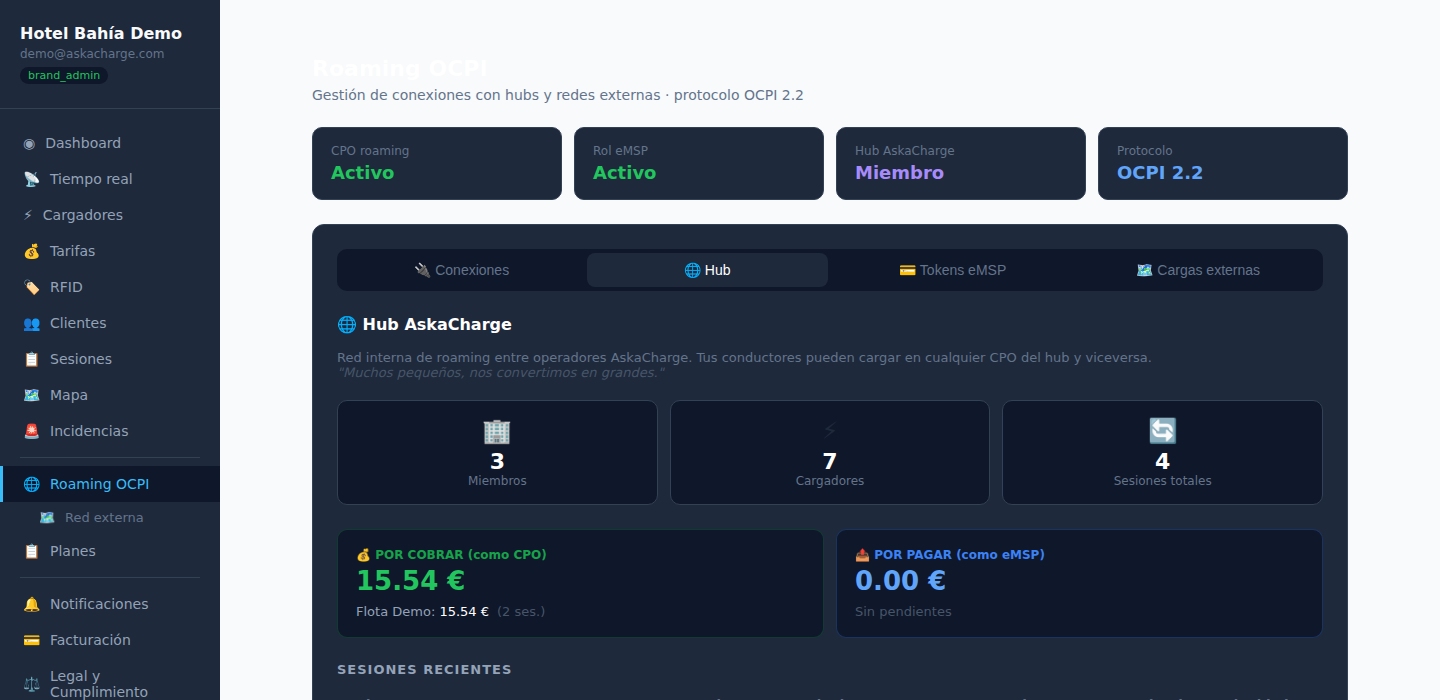
askacharge.com Hub / OCPI roaming
The askacharge.com Hub is an internal roaming network between brands/operators sharing
the platform: a single OCPI integration gives access to all chargers in the network,
with no need for individual bilateral agreements. Towards external partners (Hubject,
GIREVE, ocpi.io...), the Hub presents itself as a single OCPI 2.2 party:
ES*ACH.
https://askacharge.com/askacharge/ocpi/hub/versions
Commission model: 1% per cross-brand session, settled on the 1st of each month. The
eMSP charges the driver using their saved card and askacharge.com transfers to the CPO —
with no payment risk between brands, since both billing accounts are on the same
platform. External membership requests: POST /api/public/hub/apply,
see also the Hub page.
Spanish tax invoicing
askacharge.com generates and submits invoices to Spanish tax systems automatically, with no additional configuration required from the operator beyond entering their tax details during onboarding. The platform detects the brand's territory and applies the corresponding system.
Verifactu — common territory (AEAT)
Each completed transaction generates an invoice record in Verifactu format
(Royal Decree 1007/2023): XML signed with the chained SHA-256 hash chain,
a validation QR code, and automatic submission to the AEAT SOAP web service.
Records are stored with the tax authority's response status (aeat_ok,
error code, timestamp). Rejected invoices enter an automatic retry queue.
TicketBAI — foral territories
For operators in Bizkaia, Gipuzkoa or Araba, the platform issues TicketBAI invoices with XAdES-EPES signature using the brand's digital certificate. They are submitted to the correct endpoint for each foral treasury. Bizkaia also supports monthly aggregated submission via LROE (Lote de Registros de Operaciones Económicas). The TicketBAI QR is included in the invoice PDF.
What gets invoiced
| Event | System |
|---|---|
| QR charging session (anonymous driver) | Individual ticket per transaction |
| Monthly invoice to fleet client | Aggregated invoice with session breakdown |
| askacharge.com invoice to brand (SaaS) | Platform operator invoice |
ERP integration
Issued invoices can optionally be synchronised with Holded via API (PUT /api/brand/erp/config).
The operator provides their Holded API key and the platform sends each invoice
at the moment of generation.
Security
The platform implements layered security: robust authentication with token rotation, software-based 2FA, OCPP protocol-level security, signing of outbound events, and GDPR privacy controls.
Authentication — JWT + rotating refresh token
The JWT access token has a 30-minute lifetime. The refresh token is issued as an
httpOnly; SameSite=Lax; Secure cookie (never accessible from JavaScript)
and is rotated on every use: when the access token is renewed, the previous refresh
token is invalidated and a new one is issued. If an already-used token is presented
again, the platform detects a potential session theft and immediately revokes all
refresh tokens for that user. The main app cookies (/app) and driver
portal cookies (/portal) are independent to prevent privilege escalation
between layers.
2FA — TOTP (RFC 6238)
brand_admin users can enable two-factor authentication with any compatible
app (Google Authenticator, Aegis, 1Password…). The flow: setup → provisioning URI + QR
→ first code verification → activation with delivery of 8 single-use backup codes
(SHA-256 in the database, plaintext shown once). 2FA is required at login if enabled.
| Endpoint | Action |
|---|---|
GET /api/auth/2fa/status | Current 2FA status |
POST /api/auth/2fa/setup | Generates TOTP secret and provisioning URI |
POST /api/auth/2fa/enable | Activates 2FA and returns backup codes |
POST /api/auth/2fa/disable | Disables 2FA (requires a valid TOTP code) |
OCPP Security Profile 2 — Basic Auth per charger
Every charger has its own credential: username = charge_point_id,
password generated when it is added and rotatable from the panel (shown once;
stored in clear because the handshake compares it in constant time, so whoever
reads the database reads the chargers' passwords — the same level as the
ws_secret of any CSMS). The WebSocket handshake requires the
Authorization: Basic … header and rejects connections without it. The
endpoint PUT /api/brand/charge-points/{id}/ws-auth rotates it
({"regenerate": true}) or sets it ({"secret": "…"}, 16-64
characters: for manufacturers with a single password per installation, such as
Zaptec) without touching the rest of the fleet.
Units without TLS. Some models only support ws://
(the Circutor URBAN, for example). For them, ws://askacharge.com/askacharge/ocpp/…
is open on port 80, but only a charger marked Allow unencrypted connection on its
page gets in (PUT …/ws-auth with {"sin_tls": true}). The rest are
rejected with reason sin_tls. Unencrypted, the password travels in clear text and is
still required. A unit that has no username and password either only gets in with an
exception granted by hand for that charger, tied to its public IP.
API keys — SHA-256 hash, scopes
API keys are stored exclusively as SHA-256 hashes — the plaintext value is only shown at creation time and can never be retrieved. Each key carries a set of read and write scopes that bound what it can do, and every write is recorded: see the API keys section.
Webhooks — HMAC-SHA256 signature
Each outbound event includes the header
X-AskaCharge-Signature: sha256=<hex>, computed using the
endpoint's own secret (unique per endpoint, never shared). The receiver can
verify the authenticity of the event before processing it.
Privacy and GDPR
For each fleet client the operator can execute:
| Endpoint | Action |
|---|---|
GET /api/brand/clients/{id}/gdpr-export | Exports all client data as JSON (sessions, payments, personal data) |
DELETE /api/brand/clients/{id}/gdpr-delete | Anonymises and deletes the client's personal data, retaining tax records with neutral references |
V2G (bidirectional charging)
Vehicle-to-Grid (V2G) lets an electric vehicle send energy back to the grid or the building. Today askacharge.com does not manage discharging: there are no bidirectional chargers on the network and the API rejects charging profiles with a negative limit. This is what exists and what is missing:
Status of the standards
| Standard | What it brings | Status on askacharge.com |
|---|---|---|
| ISO 15118-2 | Plug & Charge: the car identifies itself through the cable, no card or app | Server side implemented over OCPP 2.0.1: per-brand PKI, contract certificates (eMAID), OCSP and Get15118EVCertificate. The ISO 15118 conversation with the car is done by the charger; there is no real Plug & Charge charger on the network yet. |
| ISO 15118-20 | Bidirectional extension: the V2G/V2H discharge protocol over the same cable | Not implemented. Requires bidirectional chargers. |
| OCPP 2.0.1 | SetChargingProfile with negative power (discharge) |
Not accepted today: the API rejects negative limits. It will open when there is bidirectional hardware to test with. |
What works today: charging when power is cheap
The Smart Charging rules engine (see previous section) sets the
charging power according to price: the pvpc_max and time_range
conditions let you, for example, charge only while the PVPC is below a threshold. PVPC and
day-ahead market prices update every hour (REE for Spain, SMARD for the European zones).
With high solar penetration in Spain, the "cheap night / expensive day" pattern no longer holds: the PVPC can hit its low at midday because of solar output, and the peak moves to the evening (19:00-22:00). The rules look at the price at each moment, without assuming fixed hours, so they adapt to the season by themselves.
Driver app (marketplace)
askacharge.com includes a three-layer driver experience with no native app required: a publicly accessible map, a registration-free QR charging flow, and a full driver portal installable as a PWA.
Public map — charging marketplace
Available at /mapa without login. Shows askacharge.com chargers and the
national REVE/REE network in real time. Clicking on an askacharge.com charger opens
a modal with:
- Per-connector status (up to 4), with visual selector and real-time colour indicator
- Operator's public tariff with estimated cost per hour
- QR generated client-side for the selected connector
- "Start charging" button linking directly to the payment flow
QR charging — no account, no app
The driver scans the physical QR on the charger or the one from the map. The full flow:
- Charger info: name, status, tariff and cost estimate
- Stripe €50 pre-authorisation (Apple Pay / Google Pay / card) — manual capture of the exact amount
- Live active session: elapsed time, kWh charged, accumulated cost
- Final summary with receipt and CO₂ saved
Compatible with all tariff modes: per kWh, per hour, per session, combined, free and the ones that change with the time of day — PVPC + margin, market + margin, time-of-use periods set by the operator (peak, mid and off-peak by hour and weekday, in its local time) and energy cost + margin. For these, drivers see the current price and the rest of the day's prices before paying, and each kWh is charged at the price of the moment it was delivered. Time-of-use periods are exported to OCPI partners as time restrictions.
Driver portal — installable PWA
Each operator can offer a driver portal at /portal/{slug}/,
installable as a PWA on iOS and Android (without going through the App Store). It includes:
| Feature | Detail |
|---|---|
| eMSP token | Visual card with UID and QR for RFID charging without a physical card |
| Session history | Own sessions + external roaming CDRs unified, with kWh and cost |
| Saved payment method | Stripe SetupIntent (PSD2/SCA) for automatic billing during roaming sessions |
| Network map | Operator's own chargers + askacharge.com Hub network |
| Push notifications | Notification when charging is complete (Web Push / VAPID, managed by the driver) |
| Install prompt | Native banner to add to home screen (Android/Chrome/Safari) |
Outbound webhooks
Each brand can register custom HTTP endpoints to receive real-time events
(HMAC-signed, unique secret per endpoint) from
/api/brand/webhooks. Events: session.started,
session.stopped (energy, amount, CO₂ saved and stop reason),
charger.online (BootNotification: the one that closes a Reset),
charger.offline (disconnect or missed heartbeats),
connector.status (every StatusNotification), charger.error
(connector in Faulted), payment.captured and anomaly.detected.
The catalogue with each event's description is at
GET /api/brand/webhooks/events. An agent that sends a command can wait
for the event instead of polling.
Sandbox: simulated chargers
To test without hardware. Under Chargers there is a "Add 5 simulated
chargers" button (or POST /api/brand/sandbox, count 1–10):
within a minute they connect over OCPP, send heartbeats, charge on their own a few times a
day during daytime and answer every command like a real unit — a Reset really disconnects
them for 20 seconds and they come back, firing the charger.online webhook. Each
one comes with an RFID card <PREFIX>-TARJETA-nn. Up to 10 per brand; one
click removes them (DELETE /api/brand/sandbox) together with their sessions and
cards, and real chargers are never touched. When the real unit arrives only the OCPP URL
changes. Works the same on a trial and on a paying brand that wants to rehearse an
integration or an agent without touching its live network.
Two-minute video: test askacharge.com without a charger.
API keys — the credential for an agent or an integration
An alternative to JWT for server-to-server integrations and for AI agents. Managed
from /api/brand/api-keys, stored as SHA-256 hashes, with the plaintext
value shown only once at creation. Sent in X-Api-Key or as
Authorization: Bearer.
An API key reaches whatever the brand's human administrator reaches, bounded by the scopes that brand granted it. That is deliberate: the platform offers every option and the operator decides which ones to hand to its agent. Start read-only and widen later, or grant full access from the start.
The required scope is derived from the resource and the method: GET needs
:read, everything else :write. Write includes read. The
wildcards * and family:* are accepted.
| Family | What it covers |
|---|---|
chargers | Chargers, connectors, locations, power limits, reservations and diagnostics |
commands | OCPP commands: remote start and stop, reset, change availability, charging profiles and firmware. This is the scope that moves energy |
sessions | Charging sessions, dashboard, analytics, ESG report and incidents |
clients | Fleet clients, RFID tags and subscription plans |
tariffs | Tariffs, energy costs, PVPC and solar rules |
billing | Fleet invoices, payments, revenue sharing, per-device payback and contracted services |
fiscal | TicketBAI/Verifactu certificates and configuration, and legal details |
integrations | Webhooks, OCPI, notifications and roaming configuration |
keys | Creating and revoking API keys. Deliberately separate from the rest |
brand | Brand identity, public page, onboarding and team |
The live catalogue is returned by GET /api/brand/api-keys/scopes, so an
agent can find out which permissions exist before asking for them.
How much an API key reaches
Of the 475 operations in the API, 250 are within reach of an API key and 225 sit outside its perimeter by design: the driver portal (52), platform superadmin (40), the OCPI roaming endpoints (37+10), the public QR payment ones (18), authentication (16) and internal invoicing (19). That half is not a gap: they are operations a brand's agent has no business touching.
| Scope | Family | Operations | Location-scopable |
|---|---|---|---|
chargers | Chargers | 45 | Yes |
clients | Clients | 38 | — |
billing | Billing | 32 | — |
sessions | Sessions | 25 | — |
commands | OCPP commands | 35 | Yes |
brand | Brand and team | 22 | — |
tariffs | Tariffs and energy | 21 | — |
integrations | Integrations | 19 | — |
fiscal | Fiscal | 8 | — |
keys | API keys | 5 | — |
| Total within reach of a key | 250 | ||
These figures come from counting the published OpenAPI against the permission table, not from an estimate. You can reproduce them from openapi.json.
Granting commands one by one
commands:write covers every OCPP command, but you can grant just some of
them: commands:remote-start, commands:remote-stop,
commands:reset, commands:change-availability,
commands:unlock-connector, commands:configuration,
commands:charging-profile, commands:firmware,
commands:diagnostics and commands:local-list. An agent can
then start and stop sessions without being able to reboot the charger or change its
firmware, which are the commands that leave a unit stranded. The 1.6 and 2.0.1 routes of
the same action share a scope, and the location suffix works on them too
(commands:reset@hotel-madrid).
Narrowing a key to specific locations
In chargers, commands and sessions, a scope accepts
a location suffix: commands:write@hotel-madrid. An installer running several
sites under one brand can give an agent permission to reset the chargers in Madrid and see
their sessions, without touching or seeing the ones in Barcelona. The suffix can be repeated for several locations on the same key.
The location is the charger's location_name, compared as a slug
(Parking Norte and parking-norte are the same one). Your brand's
actual locations are returned by GET /api/brand/api-keys/scopes, and appear
as buttons in the dashboard when choosing permissions.
It narrows what the key can act on and what it can read. A
command or a creation outside its locations returns 403 naming the ones it
is allowed; a write that names neither charge_point_id nor
location_name is refused too, because there is no way to tell where it
lands. For reads, the charger listings (GET /charge-points,
/api/ext/chargers), session listings (GET /transactions and its
exports, /api/ext/sessions) and command listings
(GET /commands/jobs) return only its locations, and a charger, session or job
from another location does not exist for it (403 or 404).
Anything that aggregates the whole brand and cannot be trimmed by location —the dashboard,
analytics, the ESG report, the map— answers 403 to a location-scoped key: we
would rather it cannot see that than see another site's data.
In the other families the suffix is rejected when the key is created: a tariff or an invoice does not belong to a location. And a key without a suffix still reaches the whole brand — the widest permission granted always wins.
Retries without duplicates
Every write accepts the Idempotency-Key header. If the request is repeated
with the same key, the first response is returned along with
Idempotent-Replay: true instead of running it again. Reusing the key with a
different body returns 422, and retrying while the first call is still in
flight returns 409. An agent retries by design, and this keeps a dropped
connection from duplicating a charger, a client or a charge.
Tracked commands: job_id
A command has two moments. POST /api/brand/commands/* returns the
charger's acknowledgement inline (status Accepted or Rejected, or 400 if it
is not connected) plus a job_id, also in the
X-Job-Id header. The real effect arrives later over OCPP and closes the
job: session.started after a start, session.stopped after a
stop, charger.online after a Reset, connector.status after an
availability change.
GET /api/brand/commands/jobs/{job_id} returns the state:
acked (accepted, waiting for the effect; expected_event names
it), confirmed (it arrived; the event is in event),
timeout (nothing within 5 minutes, 10 for Reset), rejected (the
charger said no) or failed (it could not be sent). Commands whose reply is
the result —reading configuration, diagnostics, unlock— are confirmed at
once. GET /api/brand/commands/jobs?charge_point_id= lists the latest. The
same events still go out as webhooks: the job is for callers that cannot receive them,
not a replacement.
MCP server
An agent can connect over Model Context
Protocol to https://askacharge.com/askacharge/api/mcp, authenticating
with the same API key (Authorization: Bearer ask_live_… or
X-Api-Key). Nothing to install: it is plain HTTP, JSON-RPC 2.0 over POST.
It returns the tools already described — what each one does and when to use it — and
only the ones that key can run: if the brand did not grant
commands:write (or the specific command), the start, stop and reset tools do not even appear in the
list. For anything without its own tool there is askacharge_llamar_api,
which opens all 475 operations under the same permission checks. A key narrowed to
locations sees the action tools of its permissions and gets the 403 when it
uses one on a charger in another location; read tools that aggregate the whole brand
(summary, live status, incidents, power limits) are not listed for it, because the API
refuses them.
A complete example, tested in production with simulated chargers: an agent that watches and resets the chargers of one location, with the permissions it needs and the real responses.
The protocol handshake — initialize, ping and
tools/list — is answered without an API key, because that
is what MCP directories and clients ask for before they have credentials; with no key
you get the full catalogue of 25 tools, which is public anyway. Running any of them
does require the key, and from there everything above applies again.
The MCP server is not a side door: every tool runs against this same REST API, so it goes through the same scopes, the same activity trail and the same rate limit.
Activity trail
Every write and every rejected attempt is recorded: which key, which operation, the
result, the source IP and how long it took. Available in the dashboard under
API keys → Activity, or over the API with
GET /api/brand/api-keys/audit (scope keys:read). Kept for 90
days. Successful reads are not recorded — an agent makes hundreds and they would bury
what matters. An attempt with a key that does not exist is logged too.
Usage limit
300 requests per minute per key. Beyond that the API answers 429 with
Retry-After.
Where an API key does NOT reach
Not even with the * wildcard: /api/auth (identity and
passwords), /api/admin (platform superadmin), the driver portal and the
OCPI endpoints. Those answer 401. A key always belongs to one brand and
cannot step outside it.
Simplified endpoints
Besides the full API, two convenience endpoints with a stable shape, meant for integrations that only need to pull data:
| Endpoint | What it returns |
|---|---|
GET /api/ext/chargers | Brand's chargers and their status |
GET /api/ext/sessions | Charging sessions |
Related links
| Pricing | Full price list: what you pay for, what you do not, and why |
| Home Assistant integration | Status, session energy and power, and start/stop from Home Assistant, with an API key (Sessions: read). Installs from HACS. It is not an OCPP server: the charger stays on askacharge.com |
| Public charger map | Real-time coverage, no login required |
| askacharge.com Hub | Operator roaming network, live statistics |
| Create an account | 30-day free trial |